You Asked an AI About Your Health. Who Else Was Listening?
A hands-on investigation of advertising trackers, analytics and data flows in major AI chatbots, using browser network captures, TLS-decrypted Wireshark packet analysis, and synthetic sensitive prompts.

Table of Contents
Select a screenshot or diagram to enlarge it.
We increasingly discuss things with AI chatbots that we would not casually post on social media: career problems, business decisions, relationships and health concerns. We type them into a chat window and expect an answer. But what else happens in the browser while we do that?
A recent study by researchers affiliated with IMDEA Networks Institute, Prompt like a Butterfly, Sting like a Tracker: A Privacy Analysis of Web and Mobile Conversational AI Agents (in press for PETS 2027), investigated advertising and tracking services across major conversational AI platforms. Another large-scale measurement study, Penny for Your Prompts: A Measurement Study of Contextual Leakage in AI Chat Platforms (arXiv:2610.37467, October 2026), evaluated 42 platforms and reported that 21 leaked conversation titles and 9 leaked verbatim user prompts to third-party trackers.
I wanted to verify and measure some of this myself—on a smaller scale, of course, compared to the research teams. I captured browser traffic from real chat sessions, inspected the outgoing requests and checked whether my fictional medical question, or information about it, went elsewhere.
The short version: I found advertising requests, prompt text in internal analytics, and requests to Google and Bing for citation icons. I did not find evidence that an independent advertising company or data broker received the complete test prompts.
A tracker being present on a site is not the same as a third party receiving your entire conversation. I used four categories to keep those findings separate.
Four types of browser traffic
- Tier 1 — Core inference APIs (e.g.
chatgpt.com/backend-api,gemini.google.com/_/BardChatUi): Send your prompt to the model and return its response. These requests are needed for the chatbot to work. - Tier 2 — First-party product analytics (e.g.
www.perplexity.ai/rest/event/analytics): Record how people use the product. I checked whether these events contained prompt text as well as usage metadata. - Tier 3 — Monitoring and diagnostics (e.g. Datadog, Sentry, Microsoft OneCollector, Intercom): Help teams detect crashes, errors and performance problems. URLs, error reports or session recordings can also contain conversation information.
- Tier 4 — Advertising and cross-site tracking (e.g. Twitter/X Ads pixels): Measure advertising campaigns and support audience profiling across websites.
The experiment
I used Chrome’s Network panel (inside Developer Tools) to save HTTP Archive (HAR) captures while interacting with the chatbots. These files record browser-visible requests, including destinations, HTTP methods, headers, URLs and request bodies. I reviewed captures across multiple sessions:
| Service | Session / Tier | Captured requests |
|---|---|---|
| ChatGPT (Neurology canary) | Paid / Logged in | 59 |
| ChatGPT (Fertility + Search) | Paid / Logged in | 81 |
| ChatGPT | Logged out | 459 |
| Claude Pro (Initial session) | Paid / Logged in | 84 |
| Claude Pro (Fertility canary) | Paid / Logged in | 83 |
| Gemini (Neurology canary) | Paid / Logged in | 39 |
| Gemini (Fertility + Search) | Paid / Logged in | 37 |
| Microsoft Copilot (Neurology canary) | Logged in | 201 |
| Microsoft Copilot (Fertility + Search) | Logged in | 212 |
| Grok (Neurology canary) | Logged in | 49 |
| Grok (Fertility + Search) | Logged in | 44 |
| Perplexity (Neurology canary) | Logged in | 977 |
| Perplexity (Fertility + Search) | Logged in | 806 |
I used two fictional medical scenarios: a diagnosis of multiple sclerosis (canary MED-PRIVACY-7F39X2) and an unsuccessful fertility / IVF treatment (canary FERT-PRIVACY-9X52K7). No real patient medical data was used.
The identifiers acted as canaries: I could search for them in outgoing requests to see where the test prompts went. I also checked medical terms, conversation titles and identifiers, citation lookups and telemetry.
These are observations from individual sessions, using consumer accounts rather than enterprise subscriptions. The captures differ in length and in the resources loaded, so request counts are not a ranking of how much a service tracks its users.
What I found
1. Grok: conversation URLs sent to Twitter Ads
Grok sent the conversation URLs to Twitter/X Ads
In both captures, Grok sent requests to Twitter’s advertising servers:
GET https://analytics.twitter.com/i/adsct?...
GET https://t.co/i/adsct?...
The query parameters included:
-
tw_document_href: The request included the full conversation URL:https://grok.com/c/e7515753-6d05-413d-9107-9486beaf4303?rid=54859efc-5bc2-4875-8159-e13ea37fafa3. -
twpid: Passed the user’s Twitter Advertising Pixel identifier (tw.1793997185869...). -
events:[["auto_long_site_dwell", {}]]withintegration: advertiser. -
tw_document_referrer:https://www.google.com/.
The medical prompt text was absent from the ad request, but the conversation URL and response identifier were sent alongside the advertising identifier.
Citation icons loaded from Google
When Grok answered the fertility prompt, it cited academic papers from researchgate.net, sciencedirect.com, and link.springer.com. To display source icons in its interface, Grok’s frontend sent cross-site requests directly to Google’s public favicon service:
GET https://www.google.com/s2/favicons?domain=researchgate.net&sz=256
GET https://www.google.com/s2/favicons?domain=sciencedirect.com&sz=256
GET https://www.google.com/s2/favicons?domain=link.springer.com&sz=256
Each request carried Referer: https://grok.com/ and Chrome’s x-client-data header. Google received the cited domains to provide their icons. I am not sure why this is built like this, but I found it interesting.
Grok noticed the privacy marker
In POST /rest/app-chat/conversations/.../load-responses, Grok mentioned the canary in its answer:
“The ‘confidential fertility treatment reference’ you provided (
FERT-PRIVACY-9X52K7) suggests you may be concerned about privacy…”
The model noticed the privacy concern, while the website still sent the conversation URL to Twitter’s ad servers.
2. Perplexity: the complete prompt in product analytics
The same prompt appeared in three analytics events as well
In both sessions, Perplexity sent my complete prompt, including the respective canary token (MED-PRIVACY-7F39X2 or FERT-PRIVACY-9X52K7), to its first-party analytics endpoint:
POST https://www.perplexity.ai/rest/event/analyticsThese requests returned HTTP 200 OK. Three analytics events all contained the prompt:
submit query(fired immediately upon prompt submission)query first server response(fired when initial streaming begins)SUCCESSFUL response(fired upon complete answer generation)
This behaviour is a bit weird to me. I expected the question to go to the model, but did not expect three extra copies in analytics.
The payloads also included client_event_id, visitor_id, frontend_uuid, timezone (Europe/Amsterdam), and search parameters (mode: "copilot", model_preference: "turbo").
Search citations query Google Favicons and gstatic
Perplexity also loaded citation icons from Google. The fertility answer included requests such as:
GET https://www.google.com/s2/favicons?sz=128&domain=reproductivefacts.org
GET https://www.google.com/s2/favicons?sz=128&domain=asrm.org
GET https://www.google.com/s2/favicons?sz=128&domain=my.clevelandclinic.org
GET https://t2.gstatic.com/faviconV2?client=SOCIAL&type=FAVICON&url=http://my.clevelandclinic.org&size=128
GET https://t3.gstatic.com/faviconV2?client=SOCIAL&type=FAVICON&url=http://reproductivefacts.org&size=128
These requests included Referer: https://www.perplexity.ai/ and Chrome’s x-client-data header.
Datadog Real User Monitoring (RUM)
In both captures, the browser dispatched three background monitoring requests to:
POST https://browser-intake-datadoghq.com/api/v2/rumThe Datadog requests had response status 0 in the HAR; delivery could not be confirmed. Neither canary nor medical prompt text appeared in their payloads.
3. Gemini: analytics titles and citation text
Conversation title timing
Gemini generated requests to Google Analytics:
https://region1.google-analytics.com/g/collectIn the initial capture immediately following the response, the requests carried the page-title parameter dt=Google Gemini, alongside events such as current_conversation_mode.
The IMDEA paper highlighted that Gemini transmitted conversation-derived titles to Google Analytics. Why did my initial capture only show the generic dt=Google Gemini?
Gemini generates the conversation title after the answer finishes. A capture made too early can therefore show only “Google Gemini”. Later page reloads or chat navigation can trigger analytics calls with the updated title.
Clearcut telemetry logging citation text fragments
In the search-grounded fertility session, Gemini’s frontend connected to Google’s centralized telemetry:
POST https://play.google.com/log?format=json&hasfast=true&authuser=0The payload (boq_gemini-web-uiserver) included text from a search citation in a scroll-to-text link. The URL encoding looks a bit cryptic, but you can still read the content:
Why%20IVF%20Cycles%20Fail%3A%20The%20Major%20Categories...or%20result%20in%20very%20early%20pregnancy%20loss.The request headers transmitted:
-
Referer: https://gemini.google.com/(linking the event explicitly to the Gemini web app) -
x-client-data(Chrome’s experiment/variation identifiers) -
x-goog-authuser: 0(the active Google profile index)
I found the canary in Gemini’s model interface (gemini.google.com/_/BardChatUi), but not in the Google Analytics requests or requests to external third parties.
4. Claude: no direct third-party requests observed
In the Claude Pro fertility session, all 83 requests went to two first-party origins:
-
assets-proxy.anthropic.com(70 requests): The scripts, styles, fonts and images in this session loaded through Anthropic’s domain. That makes it harder to tell which outside providers might be involved. -
claude.ai(13 requests): Handles all user authentication, conversational RPCs, and diagnostic telemetry.
The IMDEA study reported direct connections to Datadog and Intercom. I did not observe either in this session (build 923c3e2bef).
Reverse-proxied Datadog RUM (/api/v2/rum)
Claude sent Datadog Real User Monitoring (RUM) requests through its own domain:
POST https://claude.ai/api/v2/rum?ddsource=browser&dd-api-key=pub71869dceb...&dd-evp-encoding=deflateThese requests returned HTTP 202 Accepted. The Datadog parameters were visible in the URL, even though the browser connected to claude.ai. A first-party address alone does not show who processes the data downstream.
The examined payloads contained performance metrics and session identifiers. I did not find the canary or medical prompt text in them.
Connect RPC over binary Protobuf
Claude used Connect with binary Protobuf for its conversation requests:
POST https://claude.ai/claudeai-rpc/anthropic.bard.api.v1alpha.ConversationService/PerformAction
POST https://claude.ai/claudeai-rpc/anthropic.bard.api.v1alpha.ConversationService/StreamTimeline
The request headers specify content-type: application/proto and connect-protocol-version: 1. The binary payload included the prompt, model configuration (claude-opus-5-5), client locale (de-CH, en-US), timezone (Europe/Amsterdam) and locally registered client tools.
First-party event logging
Claude logs frontend user interactions to an internal batching endpoint:
POST https://claude.ai/api/event_logging/v2/batchI found events such as app.bootstrap, chat.conversation_create, and chat.message_send. Each event records timestamps, client build hashes, and the unique conversation_id (608acd5b-17f2-456d-969c-03c8065e83dd).
I found no prompt text, canary token or conversation title in this analytics payload.
Claude did not load web search citations with external logos during this test. Its lack of favicon requests therefore does not establish how it behaves when using comparable search features.
5. Copilot: Bing favicon queries, OneCollector, and earlier chat titles
Bing favicon queries for cited medical sources
When Copilot grounds an answer using live web search, it renders citations with source icons. To retrieve them, the browser queries Bing’s public favicon service directly:
GET https://services.bingapis.com/favicon?url=asrm.org
GET https://services.bingapis.com/favicon?url=reproductivefacts.org
GET https://services.bingapis.com/favicon?url=ivfduedatecalculator.us
Each request included Referer: https://copilot.com/, so Bing received both the cited domain and the originating site.
Earlier chat titles in client state sync
When a chat turn finishes, Copilot sends a client state synchronization event:
POST https://copilot.com/chat?fromcode=cmm5vstpudj&es=UnauthClickThe first-party payload contained the new conversation title and titles from earlier chats in the state.conversationPageHistoryList.chats array:
-
"chatName": "MS Treatment and Prognosis Overview"(the previous neurology test) -
"chatName": "Dataverse Business Rules Consolidation" -
"chatName": "hello"
I did not expect earlier chat titles to be included with the new interaction. These examples show titles, rather than the full contents of those conversations.
Microsoft OneCollector diagnostic telemetry
The sessions generated 13 requests to Microsoft OneCollector:
POST https://eu-office.events.data.microsoft.com/OneCollector/1.0/
POST https://browser.events.data.microsoft.com/OneCollector/1.0/
All returned HTTP 200 OK. Their payloads included SDK metadata, latency and view metrics. I found no prompt text or canaries in them.
6. ChatGPT: proxied monitoring and citation icons
The captured prompt requests went to chatgpt.com/backend-api/.
Reverse-proxied Datadog telemetry (/awe/)
Like Claude, ChatGPT sent Datadog monitoring requests through a first-party path:
POST https://chatgpt.com/awe/api/v2/rum?ddsource=browser&dd-api-key=pub1f79f8ac9...The examined payloads contained performance metrics, session states and view durations, with no prompt canary or sensitive text.
Citation icons loaded from Google
ChatGPT displayed source logos beside its search citations. To fetch those icons, the web app queries Google’s public favicon service directly from the user’s browser:
GET https://www.google.com/s2/favicons?domain=https://www.hfea.gov.uk&sz=32
GET https://www.google.com/s2/favicons?domain=https://www.asrm.org&sz=32
GET https://www.google.com/s2/favicons?domain=https://www.nn.nl&sz=32
GET https://www.google.com/s2/favicons?domain=https://autoriteitpersoonsgegevens.nl&sz=32
These requests disclosed the cited domains to Google, including fertility organisations and a Dutch insurer. I did not find prompt text or canaries in the favicon requests.
Direction of traffic in logged-out sessions
The logged-out HAR contained a request to www.google.com/aclk, a Google Ads click URL. Examining its HTTP headers confirmed this was an ad click leading into ChatGPT, rather than ChatGPT exporting data out to Google Ads.
Follow-up captures with Wireshark
I followed up with Wireshark captures of ChatGPT and Grok, using Chrome’s TLS session keys (SSLKEYLOGFILE) to decrypt the traffic. This let me inspect HTTP/2 and HTTP/3 streams outside the browser’s Network panel.
I kept the downloaded JavaScript’s capabilities separate from what I actually saw transmitted. Loading a script that can read a title does not prove it sent that title anywhere.
1. ChatGPT packet investigation: first-party telemetry and backend APIs
I inspected two Wireshark captures for ChatGPT: an initial logged-out baseline and a logged-in ChatGPT Plus session. If you do the same, I would recommend saving your captures. I used names like chatgptloggedin3.pcapng. Then you can inspect them later or compare them with a Python script, which is what I did.
Logged-out baseline: first-party event telemetry
In the logged-out recording, Wireshark recorded packet 179:
POST https://chatgpt.com/unauth-mweb/events/business
content-type: application/json
The reconstructed stream contained a JSON event about session management:
{
  "anonymousId": "[redacted for security reasons]",
  "events": [
    {
      "kind": "prepare_refresh_opportunity",
      "reason": "token_reuse",
      "occurredAt": "2026-11-07T08:32:03.582Z"
    }
  ]
}
The request headers carried browser metadata, origin: https://chatgpt.com, and consent cookies (oai_consent_analytics=true and oai_consent_marketing=true). This payload confirmed first-party telemetry reporting token-refresh events; it contained no user prompt or medical terms and represents internal service operation rather than third-party tracking.
Logged-in Plus session: backend conversation endpoints
In chatgptloggedin3.pcapng, I decoded 16 ChatGPT request-header packets out of 2,369 total packets. I started capturing before launching the browser so Wireshark could record the TLS handshake. The decoded requests included:
| Observed Endpoint | HTTP Action | Functional Purpose |
|---|---|---|
/backend-api/f/conversation/prepare | POST | Prepares conversation state and client parameters |
/backend-api/f/conversation | POST | Conversation submission and model streaming |
/backend-api/sentinel/chat-requirements/prepare | POST | Pre-submission integrity/anti-bot challenge preparation |
/backend-api/sentinel/chat-requirements/finalize | POST | Chat requirements validation finalization |
/backend-api/conversations | GET | Fetches user’s conversation history list |
/backend-api/conversations/{id} | GET | Retrieves existing conversation thread |
/backend-api/apps/apps/patch | POST | Client application state update |
/backend-api/connectors/links/list_accessible | POST | Enumerates accessible third-party connector links |
/backend-api/codex/notification/subscriptions | POST | Notification subscription management |
All 16 decoded request-header packets used chatgpt.com as their authority. This covers only the traffic successfully decoded in that capture.
2. Grok packet investigation: the StackAdapt advertising integration
In grokloggedin.pcapng, I found two decoded requests to StackAdapt, an advertising and retargeting provider:
- Packet 9237:
GET https://tags.srv.stackadapt.com/events.js - Packet 11856:
GET https://tags.srv.stackadapt.com/events.js
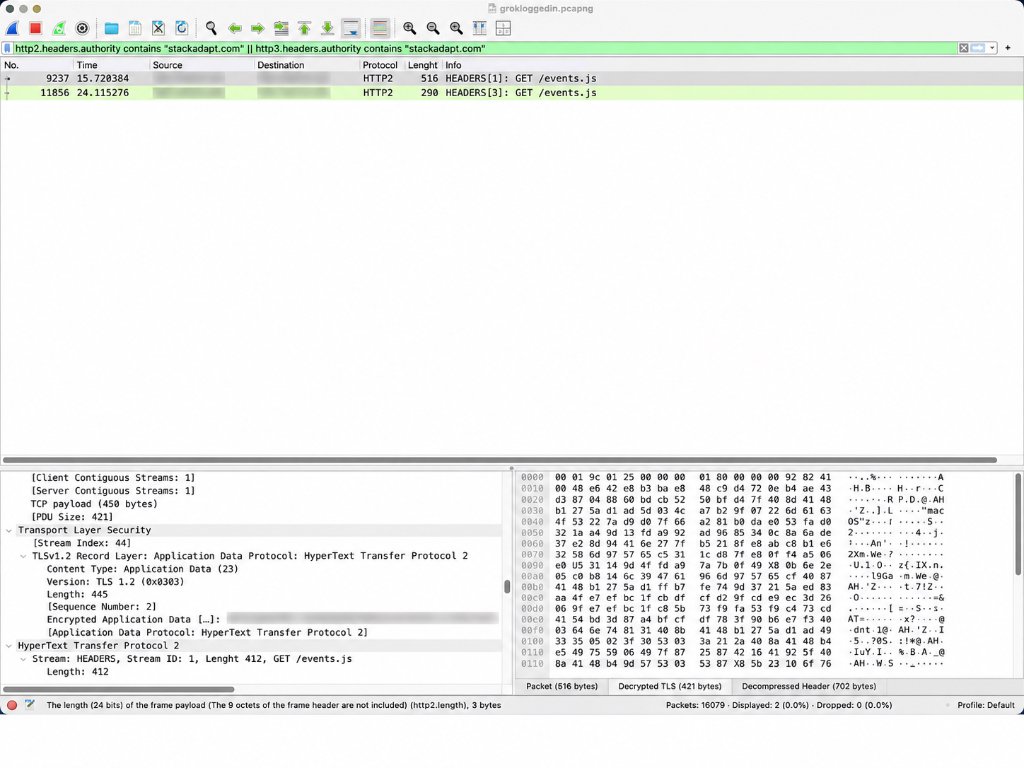
The reconstructed HTTP exchange showed:
:method: GET
:authority: tags.srv.stackadapt.com
:path: /events.js
referer: https://grok.com/
dnt: 1

:status: 200
content-type: text/javascript
content-encoding: gzip
cache-control: max-age=5
set-cookie: sa-user-id=[redacted]; Max-Age=31536000; Secure; SameSite=None
set-cookie: sa-user-id-v2=[redacted]; Max-Age=31536000; Secure; SameSite=None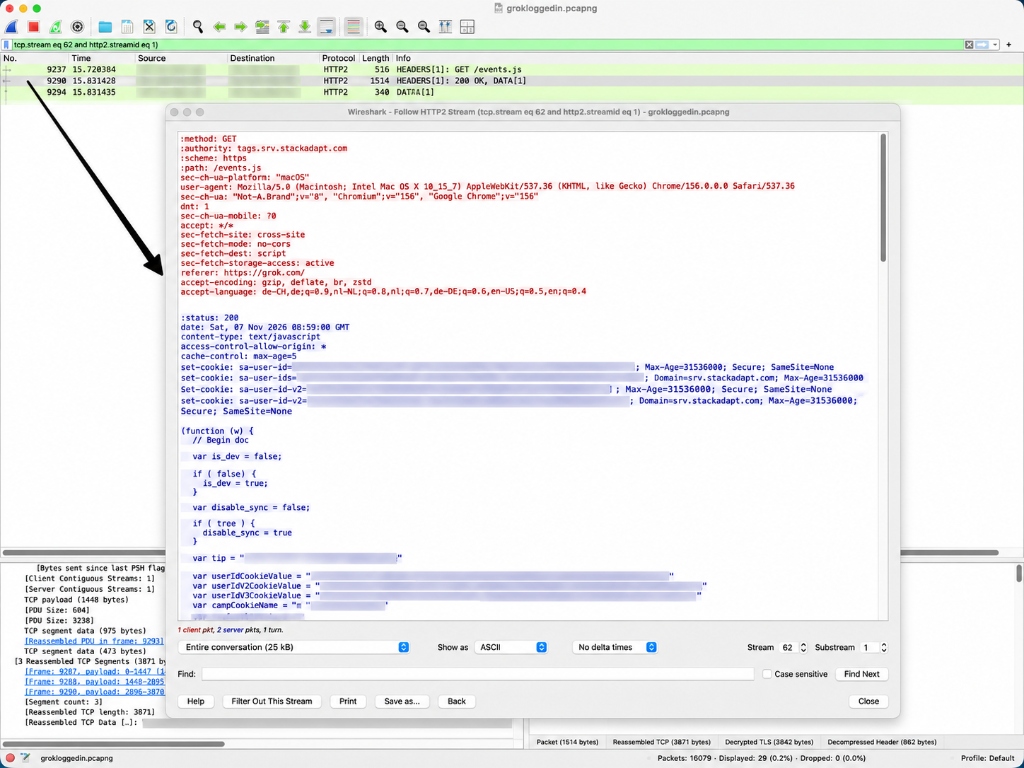
365-day tracking cookies
The response delivered the StackAdapt tracking script and issued Set-Cookie directives for sa-user-id and sa-user-id-v2 with Max-Age=31536000 (365 days / 1 year) and SameSite=None; Secure. The server requested a one-year lifetime, although browser policies may limit actual retention. SameSite=None; Secure allows the cookie to be sent in cross-site requests, subject to the browser’s cookie restrictions.
Code capabilities in downloaded events.js
I inspected the downloaded JavaScript (events.js) and found code for the following functions:
| Tracking Capability in JavaScript | Implementing Code / Logic | What the Code Enables |
|---|---|---|
| Page URL / Context | window.location.href, getBasePageUrl(), currentLandingURL() | Extracts full active URL to append to tracking pings |
| Page Title | document.title, getTitle() | Reads document title, URL-encodes it, and appends via t= parameter |
| Interaction Counters | Document click & pointer listeners; counters n_c, n_t | Counts total clicks and taps during user session |
| Mouse Movement | mousemove event listener; counter n_m | Tracks mouse movement activity count (counts events; does not record coordinate paths) |
| Form Submissions | submit event listener; counter n_s | Increments submission counter (does not harvest input field values in this function) |
| Window State | blur event listeners; counter n_b | Detects when user tabs away or minimises window |
| Scroll Depth | calculateScrollDepth(), counter n_sd | Measures how far down the page the user scrolled |
| Time on Page | jsPing, ifr_ts, periodic timers | Sends periodic heartbeat pings to measure dwell time |
| Attribution | utm_source, referral headers, sa-u-source in local storage | Stores campaign referral channels across navigation |
| Conversion Tracking | /conv?cid=...&url=...&t=... | Generates conversion tracking calls with page title and URL |
| Tracking Endpoints | /saq_pxl, /js_tracking, /ifr_pv, /ifr_ts | Multiple fallback pixel and iframe mechanisms |
| Retargeting & Lookalikes | /rt, /lal | Functions supporting programmatic audience building |
| Cross-Session Identifiers | sa-user-id, sa-user-id-v2/v3, local storage sync | Manages persistent user identifiers across visits |
The script configuration also contained internal flags:
var disable_sync = true;
var isOptOut = false;
The disable_sync=true flag indicated that external cookie-syncing was disabled in this configuration. The script still contained the tracking functions listed above. You can fire up Wireshark and inspect the script yourself.
Did StackAdapt actually transmit tracking data?
I then checked for StackAdapt requests other than the script download:
(http2.headers.authority contains "stackadapt.com" ||
 http3.headers.authority contains "stackadapt.com") &&
!(http2.headers.path contains "events.js") &&
!(http3.headers.path contains "events.js")
Result: 0 matching decoded request headers.
In this recorded session, I found no follow-up tracking requests in the decoded traffic to StackAdapt. Neither the synthetic medical canary (FERT-PRIVACY-9X52K7), nor the prompt text, nor the conversation title appeared in any outgoing StackAdapt transmission.
[!TIP] A filter that initially tricked me: I am still a beginner with this type of analysis. A broad filter for
path contains "/conv"returned 29 matches, but every match was an internal request to Grok’s own conversation endpoints! I had to filter by the destination domain as well as the path.
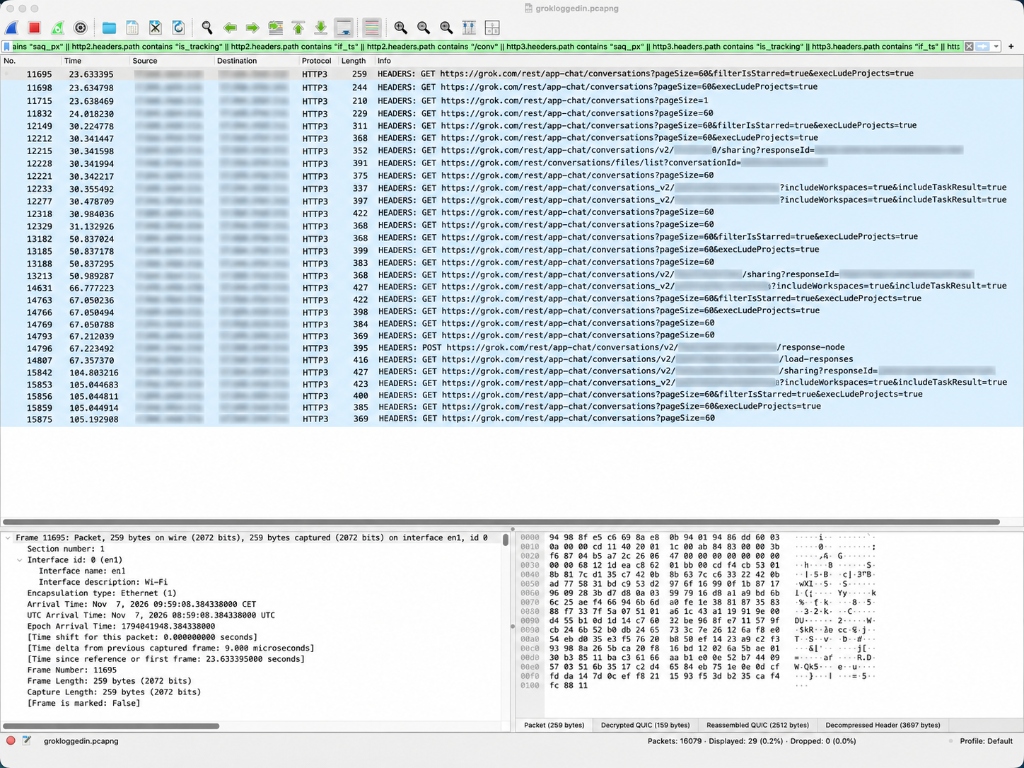
Distinguishing ad tracking from cookie consent and CDN infrastructure
A broad filter for twitter.com and t.co also matched 9 packets:
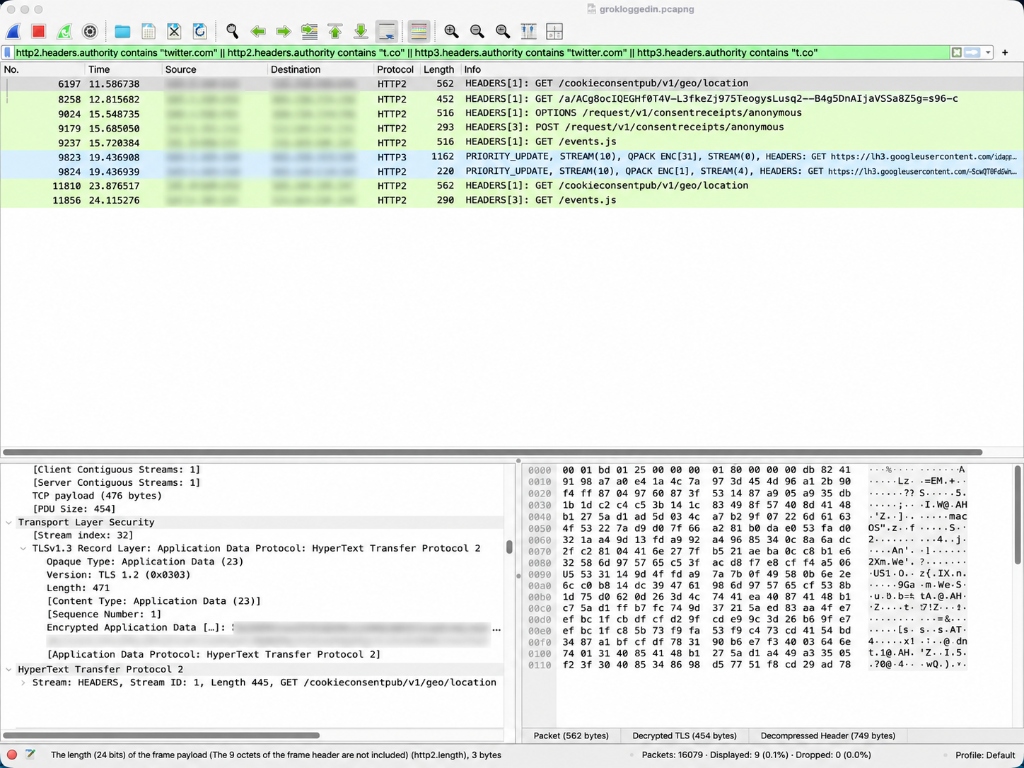
These matches included consent receipts (/request/v1/consentreceipts/anonymous), geolocation checks (/cookieconsentpub/v1/geo/location), Google profile images (lh3.googleusercontent.com) and the StackAdapt script downloads. The substring t.co also matches stackadapt.com, so the filter was much broader than I intended.
What these captures cannot tell us
A browser capture shows requests between my device and a server. It cannot show what happens later between a chatbot provider and its business partners, or who can access the data internally.
Finding the complete prompt in Perplexity’s analytics left me with questions: why record the text there, who can access it, and how long is it retained? I could not answer those from browser traffic alone.
How to repeat the tests
Level 1: Browser DevTools and automated HAR scanning
For a browser-level capture:
- Launch a fresh browser profile without extensions.
- Open Developer Tools → Network and check Preserve log.
- Start recording before submitting your query.
- Send a fictional prompt containing a unique synthetic canary token (e.g.
MED-PRIVACY-7F39X2orFERT-PRIVACY-9X52K7). - Allow the model response to finish and wait for the asynchronous conversation title to generate. Reopen the thread or navigate to another chat to trigger state synchronization.
- Search the Network panel for the canary, medical terms, and conversation UUIDs.
- Export a sanitized HAR file. Before sharing, check for credentials and redact private prompt text, URLs and identifiers; sanitizing does not remove all sensitive content.
Automated HAR scanning with Python
I used a companion Python script to scan the HAR files. Download the script, save it in your working folder, then run:
# Scan a capture for canary tokens and medical keywords:
python3 analyze_har.py path/to/capture.har MED-PRIVACY-7F39X2 "multiple sclerosis"

# Inspect the full request headers, query parameters, and payload of a specific entry:
python3 analyze_har.py path/to/capture.har --entry 35
The script searches URLs, query parameters and request bodies for keywords, checks Google Analytics page titles (dt=), and flags known advertising, analytics and monitoring endpoints. Its categories are a starting point for manual review.
Level 2: Wire-level packet inspection with Wireshark and TLS decryption
For the follow-up packet captures, I used this macOS setup:
1. macOS prerequisites
- Install the official distribution of Wireshark.
- If Wireshark reports
Cannot open BPF device /dev/bpf0: Permission denied, install the ChmodBPF package included with the Wireshark installer and log out and back in. - Identify your active network interface:
route -n get default | grep interface
# e.g., interface: en1 (Wi-Fi)
2. Launch Chrome with an isolated profile and TLS secret logging
To decrypt TLSv1.3 and QUIC traffic, Chrome must log symmetric session secrets. Chrome must be launched from Terminal with SSLKEYLOGFILE set and pointed to a dedicated testing profile (--user-data-dir):
# Ensure all previous Chrome test instances are completely closed
SSLKEYLOGFILE="$HOME/Desktop/chrome-tls-keys.log" \
"/Applications/Google Chrome.app/Contents/MacOS/Google Chrome" \
  --user-data-dir="$HOME/chrome-privacy-test" \
  --no-first-run \
  --new-window "https://chatgpt.com"
[!IMPORTANT] Why launch the binary directly? Using
open -a 'Google Chrome'can attach to an already-running browser that does not inheritSSLKEYLOGFILE. Launching the executable with a dedicated--user-data-dirkeeps the test separate from your everyday profile. I wanted to avoid extensions and other browser activity muddying the results. Do not usesudo.
Verify that Chrome is writing TLS keys to disk:
ls -lh "$HOME/Desktop/chrome-tls-keys.log"
head -n 3 "$HOME/Desktop/chrome-tls-keys.log"
# Expected entries: CLIENT_HANDSHAKE_TRAFFIC_SECRET, CLIENT_TRAFFIC_SECRET_0, etc.
3. Configure Wireshark decryption
- Open Wireshark → Preferences (Settings) → Protocols → TLS.
- Set (Pre)-Master-Secret log filename to your key log:
/Users/daviduhlmann/Desktop/chrome-tls-keys.log. -
[!CAUTION] Do not touch
TLS debug file: That is an output diagnostic file. Entering your key file path there will prompt Wireshark to overwrite your keys! - Select your active interface (
en1in my case) and start capturing before opening the chatbot website so Wireshark records the handshake. This is important: I forgot twice and could not decrypt the traffic.
4. Essential Wireshark display filters
| Investigation Goal | Wireshark Display Filter |
|---|---|
| All Decoded HTTP/2 & HTTP/3 Traffic | http || http2 || http3 |
| Decoded Requests with Host / Authority | http2.headers.authority || http3.headers.authority |
| POST Requests Only | http2.headers.method == "POST" || http3.headers.method == "POST" |
| ChatGPT Requests | http2.headers.authority contains "chatgpt.com" || http3.headers.authority contains "chatgpt.com" |
| Grok Requests | http2.headers.authority contains "grok.com" || http3.headers.authority contains "grok.com" |
| StackAdapt Requests | http2.headers.authority contains "stackadapt.com" || http3.headers.authority contains "stackadapt.com" |
| StackAdapt Non-Script Transmissions | (http2.headers.authority contains "stackadapt.com" || http3.headers.authority contains "stackadapt.com") && !(http2.headers.path contains "events.js") && !(http3.headers.path contains "events.js") |
| Telemetry & Analytics Endpoints | http2.headers.path contains "events" || http2.headers.path contains "telemetry" || http3.headers.path contains "events" || http3.headers.path contains "telemetry" |
5. Reconstructing streams and searching for canaries
- Right-click any decoded HTTP/2 request header packet → Follow → HTTP/2 Stream.
- Inspect the reconstructed request and response headers, query parameters, and uncompressed body frames.
- Search the reconstructed payload for your canary markers (
FERT-PRIVACY-9X52K7orMED-PRIVACY-7F39X2in my tests), conversation titles and prompt strings. - Check the destination
:authorityand what the request contains. A prompt match under an external advertising domain would be evidence that the prompt was sent there; merely loading a script from that domain is a different finding.
6. Responsible and secure evidence handling
- Never publish raw
.pcapngfiles together with theSSLKEYLOGFILE: Anyone who possesses both files can decrypt the entire recorded session, exposing private cookies, authentication tokens, and session keys. - Sanitize exported packet data: When sharing artifacts, export locally filtered CSVs containing only request methods, authorities, and paths, or provide manually redacted HTTP header snippets.
- Isolate extensions: Background browser extensions can generate independent network traffic. Always test in a dedicated, extension-free profile to avoid false attributions.
Limitations and responsible interpretation
These tests have several limits:
- Small sample: These captures were made on 6–7 November 2026, on macOS with Google Chrome 156. I did not repeat identical tests across browsers, operating systems or regions.
- Limited features: I used text-only prompts, without attachments, voice mode, code interpreter or custom GPTs. A missing canary in one decoded capture does not rule out transmission in other sessions or features.
- Unconfirmed delivery: HAR response status
0can mean a request was aborted or blocked. It does not establish whether the server received it. - No compliance verdict: I did not establish whether the observed advertising requests complied with the applicable consent requirements.
What I take away from this
I will look more closely at Perplexity copying the full question into analytics, which still seems crazy to me, and how often displaying a citation icon caused a request to Google or Bing.
I did not observe the complete test prompts reaching independent advertisers or data brokers. Grok did send the conversation URL to Twitter/X Ads, and its StackAdapt script could read page titles and URLs, although I saw no follow-up tracking requests in the decoded capture.
Sources and method
- Oliveira, G. et al., Prompt like a Butterfly, Sting like a Tracker: A Privacy Analysis of Web and Mobile Conversational AI Agents, IMDEA Networks institutional repository (deposited September 2026; in press for the 2027 Privacy Enhancing Technologies Symposium / PETS).
- Penny for Your Prompts: A Measurement Study of Contextual Leakage in AI Chat Platforms, arXiv:2610.37467 (October 2026).
- Datadog — Browser RUM Data Collected.
- Original empirical captures (6–7 November 2026):
- Application-layer HTTP Archive (HAR) captures across ChatGPT (logged in Plus and logged out), Claude Pro, Google Gemini, Microsoft Copilot, Grok, and Perplexity.
- Wire-level TLS-decrypted Wireshark packet captures:
chatgptloggedin3.pcapng(ChatGPT Plus) andgrokloggedin.pcapng(Grok), decrypted via ChromeSSLKEYLOGFILEsession secret logs. - Downloaded JavaScript: StackAdapt
events.js(retrieved fromtags.srv.stackadapt.com). - Raw capture files are retained offline and omitted from the repository to protect private session cookies, bearer tokens, and account identifiers.